


Configuring a voice ringtone for FRITZ!Fon
You can configure a ringtone with a voice announcement on the FRITZ!Fon. When the voice ringtone is configured and a contact from the phone book in the FRITZ!Box calls, your FRITZ!Fon announces the name of the caller. If the caller's phone number is not saved in the phone book, the city or country from which the call is coming is announced.
You can configure the voice ringtone with a male or female voice and you can combine the voice message with an additional ringtone.
1 Setting up MyFRITZ!
If you are using a current FRITZ!Box model, you can skip the configuration of MyFRITZ!. Current FRITZ!Box models do not have to be registered with MyFRITZ!Net to use the voice ringtone.
If you are using an older FRITZ!Box model, register your FRITZ!Box with MyFRITZ!Net:
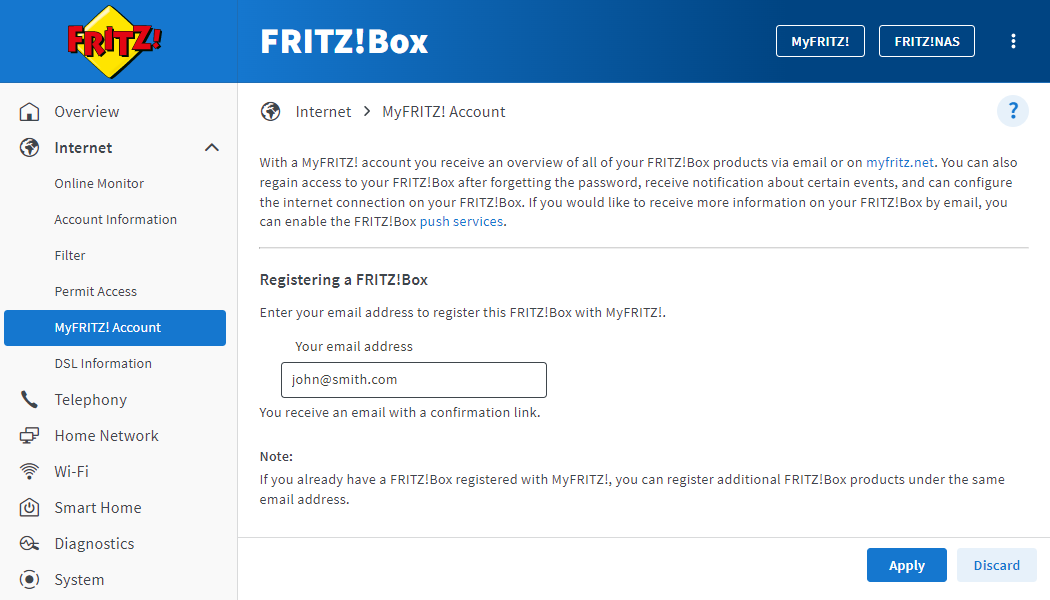
- Open the FRITZ!Box user interface by entering http://fritz.box.
- Click on 'Internet' in the menu and then on 'MyFRITZ! Account'.
- Enter your email address in the 'Your email address' field.
- Click on 'Apply'. Now MyFRITZ!Net sends you an email with the confirmation link to your FRITZ!Box.
Note:If you do not see an email in your inbox, check the spam folder of your email inbox.
- Open the email you received from MyFRITZ!Net.
- Click on the 'Register Your FRITZ!Box' button in the email.
2 Configuring a voice ringtone in the FRITZ!Box
- Open the FRITZ!Box user interface by entering http://fritz.box.
- Click on 'Telephony' in the menu and then on 'Telephony Devices'.
- Click on the
 (Edit) button for a FRITZ!Fon. The following settings apply for all FRITZ!Fons that are registered.
 - Click on the 'Ringtones' tab.
- Enable the option for male or female voice in the 'Settings for Voice Ringtone' section.
- If you want to use the voice ringtone and also play a ringtone, select the desired ringtone from the 'Additional ringtone' drop-down list.
Note:You can only use ringtones from the list. You cannot use other ringtones, for example your own, together with the voice ringtone.
- If you also want to use the voice ringtone for internal calls or calls from important persons from the phone book, select 'Voice ringtone' from the corresponding drop-down menu in the 'Ringtone Settings' section.
- Click on 'Apply' to save the settings.
3 Enabling voice ringtones on FRITZ!Fon
- Press the 'Menu' key on the phone.
- Scroll to 'Settings' and press 'OK'.
- 'Audio' > 'OK'
- Enable the 'Speech ringing for external calls' option.

