


Generating support information for the FRITZ!Box
To process your request, we need the support information from your FRITZ!Box. You can use the FRITZ!Box user interface to send us the support information. The support information is encrypted with TLS and transmitted using a randomly selected port.
Send the information while or immediately after the error occurs. Do not perform a restart before sending the support information, for example by unplugging it.
Note:The support information is used to process your request and is not passed on to third parties.
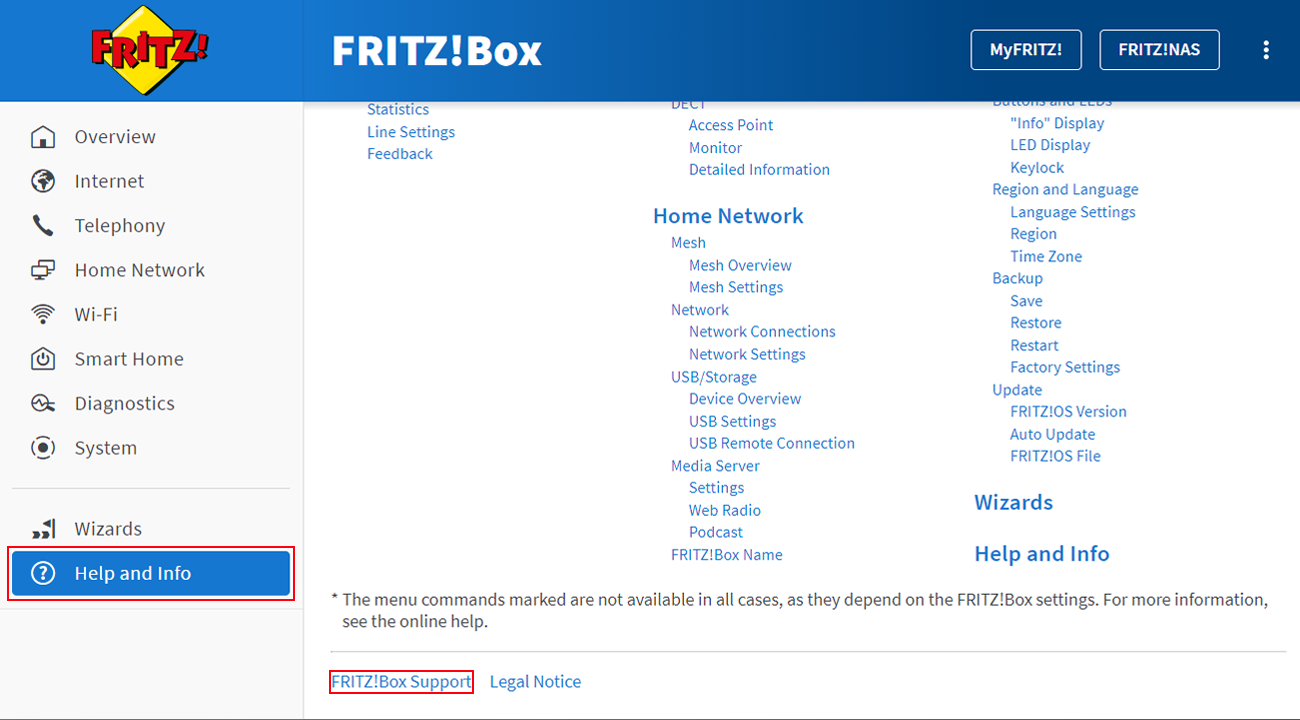
- In the FRITZ!Box user interface, click on 'Help and Info' on the bottom left of the page and then on 'FRITZ!Box Support' at the bottom.
- Click on the 'Send Support Information to FRITZ!' button and take note of the dispatch ID that is displayed after sending the support information. If the option is greyed out and the message 'Diagnostics and Maintenance disabled' is displayed:
- Click on the 'Activate' link.
- Enable the 'Diagnostic data' option and then the 'Diagnostics and Maintenance' option.
- Click on 'Apply' to save the settings.
- Repeat steps 1 and 2.
- Include the dispatch ID when you respond to the FRITZ! Support.
- If the button is not available or sending fails, save the support information as a file.

